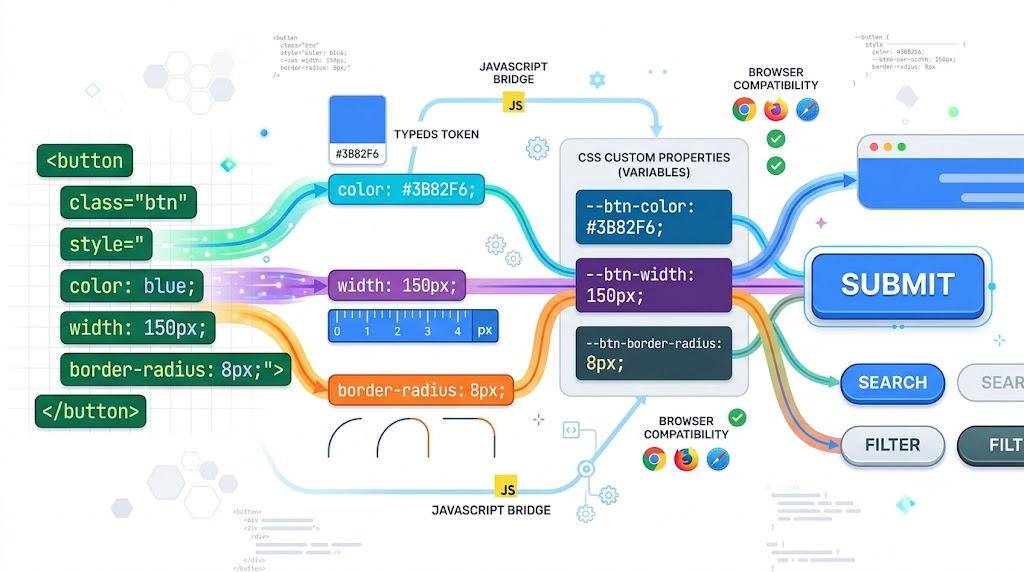
Inspired by Zhang Xinxu’s original article on CSS attr() polyfilling, with updated context for modern browser support.
For years, CSS attr() was useful but frustratingly limited. You could read an HTML attribute, but only as a string, and mostly inside generated content:
<span data-title="Tip from data-title" tabindex="0">Button</span>
span:hover::after,
span:focus-visible::after {
  content: attr(data-title);
}
That works well for tooltips, labels, and small bits of generated text. But it does not let you say, “Use this attribute as a color,” or “Treat this attribute as a length.”
🎮 Try it live: Open the interactive demo to experience this yourself.
The New Idea: Typed attr()
The newer CSS attr() syntax is much more ambitious. Instead of returning only a string, it can parse attribute values into CSS data types such as colors, lengths, percentages, and more.
Conceptually, this becomes possible:
<button bgcolor="skyblue" radius="4">Button</button>
<button bgcolor="#00000040" radius="1rem">Button</button>
<button bgcolor="red" radius="50%">Button</button>
<button bgcolor="orange" radius="100% / 50%">Button</button>
button {
  background-color: attr(bgcolor color);
  border-radius: attr(radius px, 4px);
}
Now the HTML carries component-level styling inputs, while CSS decides how those inputs map to real presentation.
Chrome has shipped advanced attr() support starting with Chrome 133, but browser support is still not universal. That makes the polyfill pattern useful for demos, progressive enhancement, and environments where you need broader compatibility.
The Polyfill Trick: Custom Properties as Messengers
The clever part is that CSS custom properties can store almost any token sequence, even if the browser does not understand it as a final property value.
So instead of writing this directly:
button {
  background-color: attr(bgcolor color);
}
We route the expression through a CSS variable:
button {
  --attr-bg: attr(bgcolor color);
  background-color: var(--attr-bg);

  --attr-radius: attr(radius px, 4px);
  border-radius: var(--attr-radius);
}
JavaScript can then find elements with relevant attributes and replace the custom property value with a browser-readable value.
const attrRules = [
  { selector: "[bgcolor]", variable: "--attr-bg", attr: "bgcolor", type: "color", fallback: "" },
  { selector: "[radius]", variable: "--attr-radius", attr: "radius", type: "px", fallback: "4px" }
];

function resolveAttrValue(element, rule) {
  const raw = element.getAttribute(rule.attr);
  const value = raw && raw.trim() ? raw.trim() : rule.fallback;

  if (!value) return "";

  if (rule.type === "px" && /^-?\d+(\.\d+)?$/.test(value)) {
    return `${value}px`;
  }

  return value;
}
The important behavior is simple: if radius="4" is found, the resolver converts it into 4px. If radius="1rem" or radius="50%" is found, it leaves the value alone.
🎮 Try it live: Open the interactive demo to experience this yourself.
Applying the Polyfill
Once values can be resolved, the script applies them as inline custom properties:
function applyAttrPolyfill(root = document) {
  attrRules.forEach((rule) => {
    root.querySelectorAll(rule.selector).forEach((element) => {
      element.style.setProperty(
        rule.variable,
        resolveAttrValue(element, rule)
      );
    });
  });
}

applyAttrPolyfill();
This is the core mechanism. CSS still owns the actual visual property:
background-color: var(--attr-bg);
border-radius: var(--attr-radius);
JavaScript only updates the variable values.
Making It Live with MutationObserver
A useful polyfill should respond when attributes change. The demo does that with a MutationObserver:
const observer = new MutationObserver((records) => {
  records.forEach((record) => {
    if (record.type === "attributes" && record.target instanceof Element) {
      attrRules
        .filter((rule) =>
          rule.attr === record.attributeName &&
          record.target.matches(rule.selector)
        )
        .forEach((rule) => {
          record.target.style.setProperty(
            rule.variable,
            resolveAttrValue(record.target, rule)
          );
        });
    }
  });
});

observer.observe(document.documentElement, {
  subtree: true,
  attributes: true,
  attributeFilter: attrRules.map((rule) => rule.attr)
});
Now changing bgcolor or radius updates the visual style immediately.
bgInput.addEventListener("input", () => {
  liveButton.setAttribute("bgcolor", bgInput.value);
});

radiusInput.addEventListener("input", () => {
  liveButton.setAttribute("radius", radiusInput.value);
});
This makes the pattern feel native: the HTML attribute changes, and the CSS-driven UI reacts.
🎮 Try it live: Open the interactive demo to experience this yourself.
Safer Defaults with Attribute Selectors
In real components, you usually want defaults. Attribute selectors let you opt into dynamic behavior only when an attribute exists:
button {
  color: #fff;
  background-color: deepskyblue;
  border-radius: 6px;
}

button[bgcolor] {
  --attr-bg: attr(bgcolor color);
  background-color: var(--attr-bg);
}

button[radius] {
  --attr-radius: attr(radius px, 4px);
  border-radius: var(--attr-radius);
}
That gives you a practical fallback model:
<button>Default</button>
<button bgcolor="mediumvioletred">Color only</button>
<button radius="24">Radius only</button>
The default button stays intact. Buttons with attributes override only the parts they declare.
Where This Pattern Gets Interesting
The same approach can power small utility APIs in HTML:
<div mt="28" pl="36">Top margin and left padding</div>
[mt] {
  --mt: attr(mt px, 0);
  margin-top: var(--mt);
}

[pl] {
  --pl: attr(pl px, 0);
  padding-left: var(--pl);
}
A polyfill can also support compound values:
<div m="10px 20px 30px 40px">Compound margin</div>
[m] {
  --m: attr(m);
  margin: var(--m);
}
That goes beyond simple single-value parsing and makes attribute-driven layout utilities surprisingly expressive.
Final Thoughts
Modern attr() points toward a more flexible boundary between HTML and CSS: HTML can expose values, and CSS can decide how those values become presentation.
Until advanced attr() support is universal, a custom-property-based polyfill gives us a practical bridge. It is not a replacement for thoughtful component APIs, and it should be used carefully, but it is a powerful demonstration of how flexible CSS custom properties really are.
Sources checked: MDN attr() reference, Chrome for Developers: CSS attr() gets an upgrade, and the original article by Zhang Xinxu.
Try It Yourself
Want to see these concepts in action? I’ve created an interactive demo where you can experiment with the code and see real-time results.
Explore more demos from my previous articles in the Demo Gallery.
Happy coding!